Xfinity is one of the largest internet service providers in the United States, offering cable internet plans with advertised speeds ranging from basic browsing to gigabit-level performance. But are you really getting the speed you pay for?
With TestWiFiNow.com, you can run an Xfinity Speed Test instantly to measure your real download speed, upload speed, and latency on WiFi, Ethernet, or even 5G hotspots.
Use the speed test tool above to check your Xfinity connection in seconds.
Table of Contents
What Is an Xfinity Speed Test?
An Xfinity Speed Test measures how fast your internet connection performs when connected to the Xfinity network. It shows real-world results rather than theoretical speeds advertised in your plan.
The test measures:
- Download Speed : Important for streaming, browsing, and downloads
- Upload Speed : Crucial for video calls, cloud uploads, and work-from-home
- Ping (Latency) : Key for gaming and real-time applications
Testing regularly helps you verify your Xfinity service quality and identify performance issues.
What Internet Speeds Does Xfinity Offer?
Xfinity offers multiple plans across the USA, including:
- Connect / Connect More : Suitable for basic browsing and email
- Fast / Superfast : Ideal for streaming and multiple devices
- Gigabit / Gigabit Extra : Designed for heavy usage, gaming, and smart homes
Actual speeds can vary depending on location, network congestion, and your home WiFi setup. That’s why running an independent Xfinity Speed Test is important.
What Is a Good Xfinity Speed?
Here’s what most U.S. users should expect from a healthy Xfinity connection:
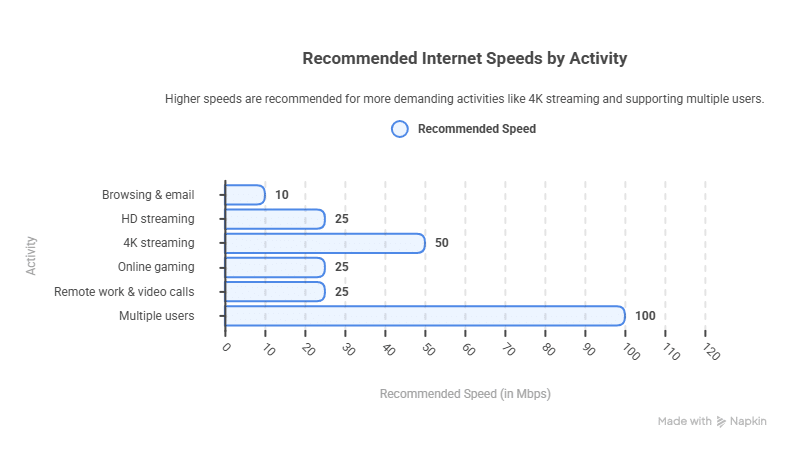
If your results on testwifinow.com are significantly lower, there may be a network or WiFi issue.
Why Is My Xfinity Internet Slow?
Common reasons Xfinity users experience slow speeds include:
- Peak-hour congestion in your area
- Outdated modem or router (not DOCSIS 3.1)
- Weak WiFi signal or poor router placement
- Too many connected devices
- Using 2.4 GHz instead of 5 GHz WiFi
- Older devices with limited WiFi capability
Running a speed test on both WiFi and Ethernet helps isolate the problem.
How to Improve Your Xfinity Internet Speed
As a network expert, here are proven fixes:
✔ Use a DOCSIS 3.1 modem approved by Xfinity
✔ Upgrade to a WiFi 6 router
✔ Place your router in a central, elevated location
✔ Switch to the 5 GHz WiFi band
✔ Restart modem and router weekly
✔ Use Ethernet for gaming or work devices
After making changes, re-run the Xfinity Speed Test above to confirm improvements.
Test Xfinity Speed on WiFi vs Ethernet
- Ethernet shows the true speed delivered by Xfinity
- WiFi shows real-world wireless performance
If Ethernet speeds are good but WiFi is slow, the issue is your router or WiFi environment not Xfinity.
Can I Test Xfinity Speed on Mobile Data?
Yes. If you’re using:
- Xfinity WiFi hotspots
- Mobile tethering
- 5G backup connections
You can still use TestWiFiNow.com to measure performance accurately.
Why Use TestWiFiNow for an Xfinity Speed Test?
✔ Independent and unbiased results
✔ Optimized for U.S. networks
✔ Works on WiFi, Ethernet, and mobile
✔ No downloads or login required
✔ Fast, simple, and free
Unlike provider-branded tests, TestWiFiNow gives you transparent, real-world results.
Run Your Xfinity Speed Test Now
If you’re using Xfinity and want to know your real internet speed, use the Xfinity Speed Test tool above to check your connection instantly.
Test your Xfinity internet speed now on TestWiFiNow.com
To get a full picture of your connection, you can also run our WiFi Speed Test to compare Xfinity performance with other networks. If you simply want to check internet speed on any connection type, our tool lets you test WiFi, Ethernet, 4G, and 5G instantly.
Frequently Asked Questions
How often should I test my Xfinity speed?
Test after installation, when speeds feel slow, and at different times of day to detect congestion.
Why is my Xfinity speed lower at night?
Evening hours are peak usage times, which can cause temporary congestion in some areas.
Does Xfinity throttle internet speeds?
Xfinity states it does not throttle regular internet traffic, but congestion and network management can affect speeds.